Screenshot Free1.5
Publisher Description
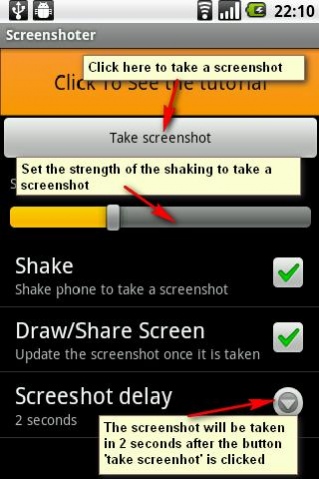
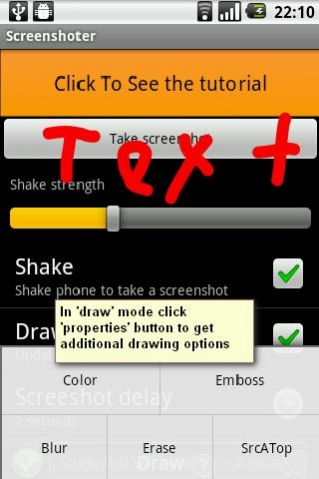

The application which allows you to create a screenshot of your android screens.
- allows you to make screenshot by just one shake
- edit screenshot with Crop and Pencil tool (new!)
- sharing (facebook, google+, evernote and more!)
- amazing widget that allows you to make delayed snapshot with just one click on your home screen
FOR MOST OF THE PHONES NO ROOTING IS REQUIRED.
IN CASE YOU SEE THE MESSAGE SAYING THAT IT IS NOT POSSIBLE TO TAKE A SCREENSHOT PLEASE PERFORM THE FOLLOWING OPERATIONS:
1. Android Phone: Go to Settings->Applications->Development and make sure that the USB debugging on your Android phone is set to ON.
2. Make sure that you have drivers installed for your phone.
NOTE: If you have not please download them here: http://junefabrics.com/android/download.php
3. Android Phone: Connect you phone to PC with USB cable.
4. PC: Download the https://www.dropbox.com/s/bmobnme27og4kmz/install.zip?dl=0
5. PC: Unzip it.
6. PC: Start install.bat file
That's it! Now you can take screenshots!
Please review the tutorial video below for more information.
The following features are coming in next version:
- set of snapshots
and more
Buy now for this small price and get all the new features for free. The price will be increased after next update.
Please write us a message if your phone is not supported with your phone model. We will try to figure it out and notify you about that.
Tags: screenshot, screen shot, snapshot
About Screenshot Free
The company that develops Screenshot Free is Wise Shark Software. The latest version released by its developer is 1.5.
To install Screenshot Free on your Android device, just click the green Continue To App button above to start the installation process. The app is listed on our website since 2017-03-14 and was downloaded 16 times. We have already checked if the download link is safe, however for your own protection we recommend that you scan the downloaded app with your antivirus. Your antivirus may detect the Screenshot Free as malware as malware if the download link to com.androidscreenshotapptool.free is broken.
How to install Screenshot Free on your Android device:
- Click on the Continue To App button on our website. This will redirect you to Google Play.
- Once the Screenshot Free is shown in the Google Play listing of your Android device, you can start its download and installation. Tap on the Install button located below the search bar and to the right of the app icon.
- A pop-up window with the permissions required by Screenshot Free will be shown. Click on Accept to continue the process.
- Screenshot Free will be downloaded onto your device, displaying a progress. Once the download completes, the installation will start and you'll get a notification after the installation is finished.
Program Details
System requirements
Download information
Pricing
Version History
version 1.5
posted on 2017-03-14
Performance optimization
Privacy Policy was added
